
• 01

    How to deal with display latency while touching or writing?

    a)Take the test on Windows OS as a reference. Use Microsoft Paint to write lines to exclude the possibility of software problem. .
    b)Verify the refresh rate of the OS. It should be 30 Hz or 60 Hz for windows OS.
    c)Confirm that whether the TV display applies the 120Hz adapter board with the MEMC dynamic compensation turning on,which can lead to the display latency. Try to modify the TV's system software and adapter board software with the help of the board manufacturers. If you are using 4K display,you need help from display manufacturers because MEMC is already set in the factory by display manufacturers.
  • 02

    Touch the reverse, draw the line on the left (top) side, and show the right (lower) side?

    a) Check whether the touch box is loaded or not. Is it in the wrong direction?;
    b) If the assembly is normal, you can use the rotary tool to adjust;
  • 03

    Touch screen no response?

    a) Check whether the wire (usb/ serial port) is connected properly, whether there is wear or tear;
    b) See if device manager detects the device, such as not detected, replaced by computer test;
    c) If the USB extension line is used, remove the USB extension cord test;
    d) If it is windows 7, or windows 7 or more, see if the tabletinputservice service is running in the system service.
    If it has stopped running, right-click the boot service; if it is not available, replace the operating system with the tablet PC component
    view method:

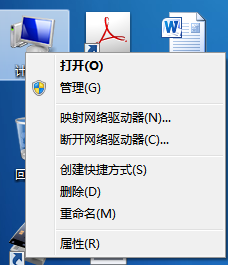
    Step 1. Computer - right - Management
    Step two. Find the services and applications on the left of the computer management interface, and click [services]
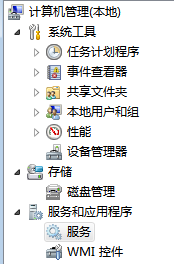
    Step three. Find in the middle window Tablet PC Input Service. You can see the enable status in the status bar
